




常見問題
您可以在我們的線上商店查看所有發票的副本: 您可以在「發票」部分找到您的 VPN Tracker 365 購買的發票,網址如下: http://my.vpntracker.com
您在會計部門工作,需要存取貴公司的 VPN Tracker 發票嗎?請讓 VPN Tracker 團隊經理邀請您加入公司的團隊,角色為「會計」。之後,您將收到電子郵件,一旦有新的發票可用,您就可以從網路入口下載它。您可以在「訂單」部分找到您的 Mail Designer 365 購買的發票,網址如下: https://my.maildesigner365.com 您可以在「訂單」部分找到您的 tizi 產品發票,網址如下: http://my.tizi.tv 其他發票可以在 http://www.equinux.com/goto/invoice 找到
‣ 如果您想保存發票的 PDF 副本,請執行以下操作:
     按“Command + P”
     選擇“PDF” > “另存為 PDF”
Mail Designer 2 與 Apple Mail 中內建的信紙功能配合使用。其他電子郵件程式沒有此功能,因此目前僅直接支援 Apple Mail。
此外,Mail Designer 2 允許您在偏好設定中設定自己的電子郵件帳戶。這可讓您直接透過 Mail Designer 2 傳送電子郵件,並使用諸如將檔案附加到您的訊息之類的功能,這在從 Apple Mail 傳送您的設計時是不可能的。
將您的設計上傳到 MailChimp 或 Campaign Monitor 也允許您使用這些服務進行大型電子郵件活動。
大多數其他電子郵件應用程式當然可以開啟和檢視您使用 Mail Designer 建立的信紙訊息。
Mail Designer kann nicht nur HTML exportieren, es macht es auch noch großartig.
Mit Mail Designer kannst du deine kompletten Vorlagen ins HTML Format exportieren. Dies erlaubt großartige Möglichkeiten, um Mail Designer noch flexibler einzusetzen:
- Importiere deine Mail Designer Dokumente bei verschiedenen Newsletter-Anbietern.
- Stelle deinen Kunden eine HTML Alternative auf deiner Webseite zur Verfügung.
Das beste an der Sache? Es ist ganz einfach!
- Erstelle dein Design.
- Wähle "Bereitstellen - HTML …" aus der Menüleiste.
- Gib an in welchen Ordner die Dateien gespeichert werden sollen.
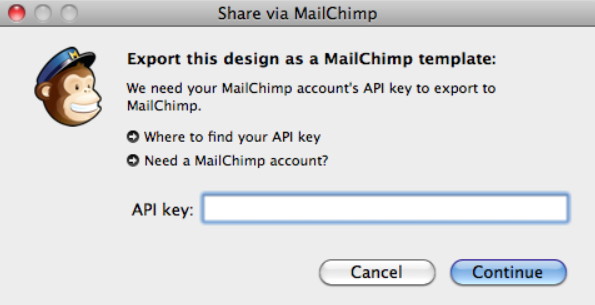
為了將範本上傳到你的 MailChimp 帳戶,Mail Designer 需要你的 MailChimp API 金鑰(一種特殊的密碼)。
你可以在 MailChimp 上找到你的 API 金鑰。 MailChimp 支援頁面 包含更多資訊。
MailChimp 提供視覺化“WYSIWYG”和基於程式碼的模板編輯。
但是,由於每個 HTML 引擎的工作方式略有不同,我們建議您堅持使用 Mail Designer 進行編輯,因為使用 MailChimp 進行的更改可能會導致您的設計在外观或佈局上出現問題。
如果您需要進行任何更改,只需重新上傳您的設計的新版本並將其選中用於您的 MailChimp 活動即可。
另一方面,如果您是 HTML 程式碼高手,只需使用 MailChimp 編輯器編輯 HTML 程式碼,直到它符合您的需求。我們請求您的理解,我們無法為此提供支援。
Mail Designer 手冊包含有關如何建立您的設計並將其匯出到 MailChimp 的資訊。一旦您將設計發送到天空中巨大的猴子,您就可以使用 MailChimp 的工具建立活動、管理訂閱者、追蹤點擊等等。
MailChimp 有太多的不同功能,我們無法在 Mail Designer 手冊中描述所有這些功能。但是不用擔心:MailChimp 團隊創建了網路研討會、操作手冊、指南和技巧 以幫助您入門。
使用 Mail Designer,您可以將專用的影片佔位符新增到您的設計中。您可以在「內容」面板的「影片佔位符」部分找到所有可用的佔位符。
新增影片佔位符後,輸入您的影片連結。Mail Designer 將自動載入影片的預覽圖像,您可以用作佔位符中的縮圖。注意:YouTube Shorts 目前不允許獲取預覽圖像。
您是否有自己的 MP4 影片片段想要使用,而無需將其上傳到 Youtube 或 Vimeo?
將您的影片檔案移至 Dropbox 的公共資料夾中,並將公共連結複製到影片佔位符中,以與您的收件人分享。
如果您在 Dropbox 帳戶中看不到「公共」資料夾,您的分享連結將以「https://www.dropbox.com/…」開頭。這不是指向該檔案的直接連結。請將「https://www.dropbox.com/…」替換為「https://dl.dropboxusercontent.com」,並在 Mail Designer 中使用此連結。這是指向影片的直接連結。
請注意,影片需要從網際網路取得,且不能作為檔案附加到您的訊息中。
iOS 自動辨識電話號碼和其他資訊,如地址和日期,因為這些資訊可以在不同的應用程式中使用。 例如,您可以點擊電話號碼以撥打電話,或點擊地址以將其添加到您的通訊錄。 因此,這些資訊會在電子郵件中突出顯示。
Mail Designer - 支援結束:2014 年 9 月

Mail Designer 2 - 支援結束:2015 年 2 月

Mail Designer Pro - 支援結束:2016 年 5 月

Mail Designer Pro 2 - 支援結束:2017 年 5 月

Mail Designer Pro 3 - 支援結束:2018 年 10 月

Mail Designer Pro HS - 支援結束:2019 年 1 月
這意味著什麼: 雖然這些版本的 Mail Designer 中的某些版本可能仍然可以在您的目前 Mac 上工作,但如果您需要購買新的 Mac 或升級到新的 macOS,它們將不再受支援。 該怎麼辦: 如果您仍然使用舊版本,我們強烈建議您 升級到現代 Mail Designer 365 方案,以保證您在方案有效期內獲得定期更新和持續支援。
- Regular email with several contacts in the To field
- Regular email with several contacts in the BCC field
- An email to a predefined group, such as an Outlook Group
- Your email service provider or the recipient's email service provider may raise suspicions of SPAM (unsolicited junk emails) sending, potentially leading to your account's suspension or temporary freeze.
- Receiving an email with an extensive list of recipients often diminishes its perceived relevance to individual recipients, making it seem impersonal and more likely to be classified as junk mail.
- Messages sent to a large number of recipients are often flagged by Junk Mail Filtering systems as Spam, increasing the risk of your message being blocked and not reaching its intended recipients.
- Mail Designer Campaigns enables you to fully verify your domain, ensuring optimal verification for your emails to reach recipients' inboxes.
- If you don't have your own domain or prefer not to undergo the verification process, we can provide you with a custom address from a fully authenticated domain, significantly reducing the risk of your emails being marked as Spam.
- We offer intelligent list management for your contact lists, allowing you to either send emails to all contacts or create targeted groups tailored to your audiences.
相反,您必須按住該連結以開啟一個選單,其中包含可用的操作,例如撰寫發送到該地址的電子郵件或將其新增到聯絡人。
在執行 iPadOS 26.1 或更新版本的 iPad 上,點擊 mailto: 連結將繼續像往常一樣運作。
- 退出 Mail Designer 365。
- 重新啟動應用程式。
- 打開您的新聞通訊並再次保存。
“此網站已被阻止,以防止自動建立電子郵件” 為了防止此錯誤對收件人產生影響,Mail Designer 會自動停用電子郵件活動中 mailto: 連結結構的追蹤。
技術說明:
Mail Designer 的連結追蹤透過重寫連結來運作,以便它們首先通過追蹤 URL,然後再開啟最終目標。對於標準 Web URL(https://),此方法可以可靠地運作,因為瀏覽器可以安全地重新導向請求。但是,mailto: 連結的行為不同。它們不是開啟網頁,而是觸發使用者的預設電子郵件應用程式並嘗試建立新訊息。在最新的 macOS 版本中,如果透過重新導向或重寫的連結啟動,蘋果會將此行為視為潛在的安全風險。
因此,macOS 會阻止追蹤的 mailto: 連結,以防止不必要的或自動化的電子郵件建立。由於此限制是在作業系統層級強制執行的,因此 Mail Designer 無法覆蓋它。
為了確保收件人獲得順暢且安全的體驗,Mail Designer 預設會停用 mailto: 連結的追蹤。這些連結將繼續按預期運作,但點擊它們不會被追蹤。