




常見問題
不!什麼也沒有,0,零,虛無,空,零,zip,zilch ... 這是 tizi 最棒的功能之一!
由於 tizi 使用 Wi-Fi 廣播其訊號,因此在使用 tizi 時,您的數據方案永遠不會受到影響。沒有 3G,沒有 4G,沒有額外費用。
是的,如果您有 Apple TV 和 iOS 裝置,您可以使用 AirPlay Mirroring 觀看您的錄製內容或直播電視!
您需要一個穩定的網路連線才能使其正常運作。透過乙太網路電纜連接您的 Apple TV 通常是最好的選擇。
對於 tizi:
設定 tizi 以設定為 tizi@Home 模式,您可以在此處找到說明。將 tizi 連接至與您的 Apple TV 相同的網路,選擇您的頻道並開啟 AirPlay 上的鏡像。
例如,在您的 iPhone 上於 tizi.tv 上選擇您的頻道後,雙擊 iPhone 的主頁按鈕,在應用程式列上向左滑動兩次以超過音樂控制,然後點擊 AirPlay 按鈕。
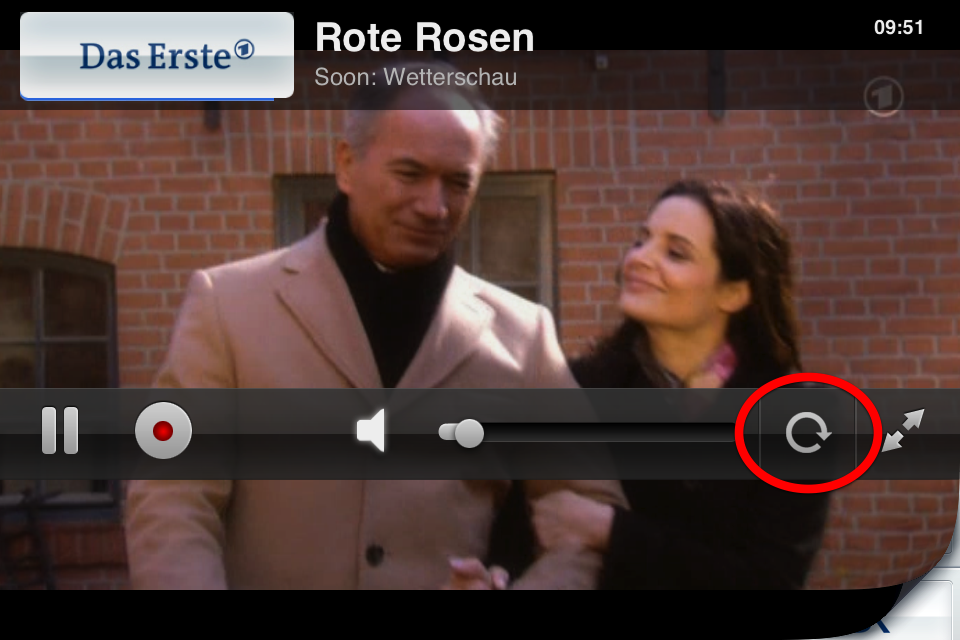
使用 tizi,您可以水平鎖定圖像,這樣在例如躺在沙發上看電視時就不會有旋轉。
要設定旋轉鎖定,請在橫向檢視中點擊旋轉符號,圖像將保持水平對齊,無論您如何握持 iPhone。
We're sorry!
Unfortunately the tizi power plug is only available in EU standard and, because the UK uses your individual 3 pin system, we don't want to sell you guys something that you'll just need to buy an adapter for when it arrives.
是的,使用隨附的 SD 卡配接器,您可以在 Mac 的 SD 卡插槽中使用 tizi+ 儲存卡。 您的 tizi+ 儲存卡將在 Finder 中顯示。 這樣,您可以將您的 tizi+ 錄音複製並歸檔到您的 Mac 上。 若要在 Mac OS X Lion 下播放,QuickTime Player 就足夠了,因為 tizi+ 以 MPEG 標準保存其錄音。
使用 SD 卡轉接器,您可以將 tizi+ storage microSD 直接插入 Mac 或 PC 上的 SD 卡插槽。
你知道還有什麼很棒的嗎?tizi+ storage 轉接器包含在每個 tizi+ storage 購買中!
如果您的 Mac 沒有內建 SD 卡讀卡器,您需要前往最近的電子商店並購買 USB SD 卡讀卡器。
你可以選擇將即時錄音儲存在 tizi+ 或你的 iPad 或 iPhone 上。前往錄音標籤頁,在 tizi+ 選項下,你可以選擇你偏好的預設設定。
排程錄音總是直接儲存在你的 tizi+ 儲存空間上。
If you can't seem to find any channels in the same place you used to find lots then it may be worth just resetting the app. To do this:
- Please quit the app entirely by double clicking the home button, holding down on the tizi icon and pressing the red 'X' that appears.
- Then go to the 'Settings' app on the iPad
- Scroll down to tizi.tv > Reset App and Reset EPG > ON (both).
- Then reset your tizi as well by poking a paperclip in the little hole on its side.
透過以下方式下載適用於 Mac 的 tizi 軟件 (DVB-C):www.tizi.tv/app
透過以下方式下載適用於 Mac 的 tizi 軟件 (DVB-T):www.tizi.tv/app
透過以下方式下載適用於 Mac 的 tizi 軟件 (WiFi):www.tizi.tv/app 或從 Mac App Store
您可以在設備的說明書上找到 tizi 代碼。由於法律原因,Mac App Store 中的 tizi.tv 版本不包含您的 tizi 硬件所需的音訊編解碼器。