


Looking for a reliable VPN Scanner to find devices and services on your remote VPN network?
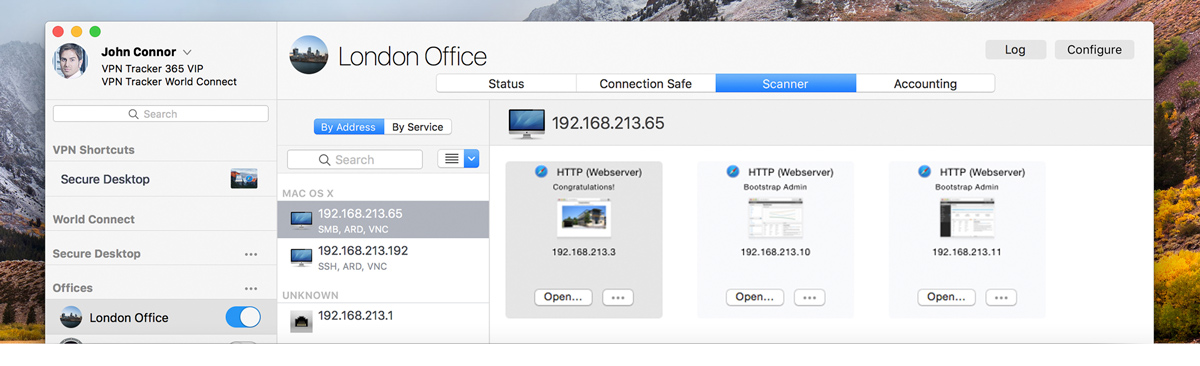
VPN Tracker’s built-in Network Scanner gives IT professionals and consultants a complete overview of every device running behind a VPN.


|
Looking for a reliable VPN Scanner to find devices and services on your remote VPN network? |
|
PRO VIP CONSULTANT VPN Tracker 365 VPN Scanner lets you find and connect to devices on remote VPN networks. Need to access a server or check if the right services are running? The built-in network scanner for Mac gives you a complete overview of all devices on a VPN connection, including operating systems and available services for direct access. Save time, scan VPN networks instantly, and get the job done faster. |
|
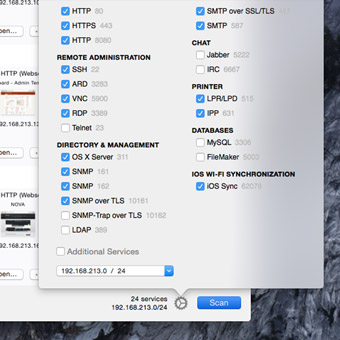
VPN Tracker’s built-in VPN Scanner for Mac automatically scans VPN networks for the most frequently used services and can be customized to check other ports. Instantly find file shares, remote administration tools, screen sharing, databases, as well as web and mail servers on your remote network.
With just one click, VPN Tracker’s VPN Scanner for Mac connects you directly to remote devices and services within your VPN network. Need to use a host’s IP address elsewhere? No problem — simply copy and paste it from the scan results for fast and reliable access.
VPN Tracker’s VPN Scanner automatically identifies different types of devices and operating systems within your VPN network and groups them together with the services they provide. This gives you a clear overview of everything running behind your VPN connection.
With VPN Tracker’s VPN Scanner for Mac, you can display scan results by IP address, host name, and operating system, or sort them by available services. Filtering options and website previews give you an instant overview of the remote VPN network you’re securely connected to.
|
If you’re on a regular VPN Tracker 365 plan, you can upgrade to VPN Tracker 365 Pro, VIP or Consultant to unlock all VPN Scanner features. These advanced plans also include other exclusive tools designed for IT professionals and consultants:
When you upgrade, the remaining time on your current plan will be pro-rated against your new plan. |
|