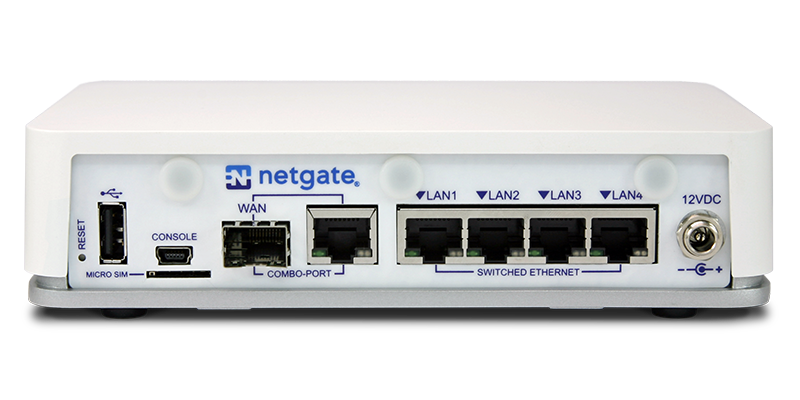
Netgate Netgate 2100
The Netgate 2100 offers higher performance than the 1100, making it a strong choice for growing businesses or branch offices. It supports IPsec, OpenVPN, and WireGuard, as well as advanced features like site-to-site VPNs and policy-based routing. With its enhanced resources, the 2100 can typically manage around 100 simultaneous VPN tunnels
| Series | Netgate pfSense+ |
| Model | 2100 |
| Recommended for | Large Business (50+ users) |
| Supported VPN standards | IPsec (IKEv1), IPsec (IKEv2), OpenVPN, WireGuard® |
| Max. number of VPN users | 100 |
| Additional features | Multi-WAN (w/load balancing),pfSense Plus SW w/lifetime upgrades, fanless operation |
| Processor cores | 2-core ARM64 Cortex-A53 @ 1.2 GHz |
| Device Status | Active |
Connect to Netgate 2100 IKEv2 VPN on Mac with VPN Tracker
To connect your Netgate 2100 with VPN Tracker, open the
VPN Tracker Connection Creator for Netgate
on your Mac, iPhone, or iPad.
Next, enter your gateway's IP address and credentials (e.g. Pre-shared Key).
Save the connection securely in your VPN Tracker Team and publish it so you and your team members have secure access to your internal network on all your devices.
Connect to Netgate 2100 WireGuard VPN on Mac with VPN Tracker
To connect your Netgate 2100 with VPN Tracker: Open VPN Tracker on your Mac, iPhone, or iPad, and
create a new WireGuard connection.
Next, add the WireGuard configuration file you created on your Netgate device – you can either scan the QR code or use the file uploader.
Then, save the connection securely in your VPN Tracker Team for secure access to your internal network on all your devices.